International guide · 2026
How to Buy on DLsite
DLsite is the largest storefront for Japanese doujin PC games, voice drama, and ASMR. It is run from Japan by EISYS, Inc., with an official English interface and checkout options for buyers outside Japan. You do not need a local address. You need a free account, a payment method that clears, and the right way to open the file.
- 01English
- 02Account
- 03Payment
- 04Coupon
- 05Play
Voice files can play in the browser. Doujin PC games are Windows downloads. Checkout options can change, so treat the payment screen in your account as the final list.
Step 1
🌐 Switch DLsite to English
Open the DLsite English homepage. The
locale=en_USparameter loads the English UI directly.- If you landed on the Japanese homepage, look at the upper-right corner of the desktop header.
- Open the language selector.
- Choose English.
The same control exists on the age-restricted doujin floor, where most paid ASMR, voice works, and adult games live: DLsite English doujin. That floor asks you to confirm you meet the age requirement before you browse. Titles, tags, and the cart then stay in English.
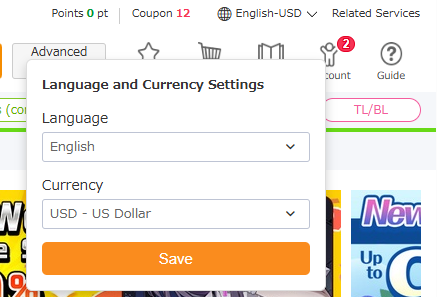
Language selector, upper-right of the desktop header ⚠️ Warning: Use your real date of birth when you register. Age-restricted games and audio stay locked if the account is under the required age. The doujin floor will not skip that check.
Prices are charged in Japanese yen. Any dollar or euro figure on the product page is an estimate, and your card issuer converts the yen charge later.
Step 2
👤 Create a Free Account
Registration is free. There is no monthly fee. The account is a viviON ID, which is what you use to log in, hold points, and open purchases.
On a computer, click Create an Account in the upper right of the English homepage. On a phone, open the menu in the upper left and choose the same item. You can also start from the viviON ID registration portal.
Email
Choose Register with an Email Address, send the confirmation message, then set a password and your date of birth. The link is valid for 24 hours.
Google or another linked service
Choose Register via a third-party service. When Google is offered, sign in, then enter the email and date of birth the form still asks for. You can link or unlink that service later.
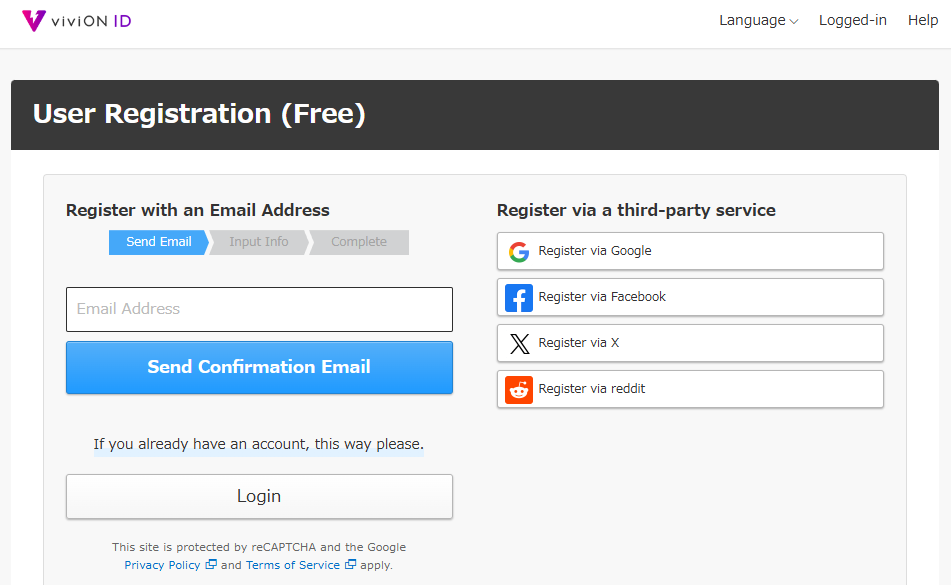
Create an Account, then email or a linked service such as Google ⚠️ Warning: The confirmation link dies after 24 hours. If it expires, start registration again. Do not open a second signup on the same address while the first email is still live. Check spam if the message is missing.
Step 3
💳 International Payments & Fallback
This is the step that stops most first-time buyers. DLsite's own payment guide says charges from non-Japanese credit cards may not go through, and that buying points first is the easier route from abroad. Every charge is still in yen. Japanese consumption tax is already included in the listed yen price.
💡 Quick Tip: Outside Japan, treat viviON points as the default. A card is worth one careful attempt, not a string of retries.
Status Method Best for What you do Limits 🔴 Unstable Credit / debit card (JCB and other brands the checkout lists) A card that can make an international credit charge, including many JCB cards. Select the card option, complete 3-D Secure if your bank asks, and confirm. The statement line reads "DLsite" and does not list the work title. Debit, prepaid, and check cards are not fully supported. Cards issued outside Japan often decline. A foreign transaction fee may apply. If payment fails, stop retrying and buy points. 🟢 Recommended viviON points (DLsite points) Buyers outside Japan, and anyone whose card was declined. On My Page, open Purchase Points. 1 point equals 1 yen. Overseas accounts see extra methods on that screen that are not offered on a normal cart. Spend the balance at checkout. Buy enough to cover the cart, not a large unused pile. Card and BitCash point purchases are credited immediately. Some other methods take about 5–30 minutes. 🟡 Mixed Alternatives (DLPay and other point sellers, BitCash) When the points screen sends you to an outside seller, or you already have BitCash. DLPay-style sellers: pay there, then enter the 16-digit code from the confirmation email on the points serial page. Points are not added automatically. BitCash: pay at checkout with the 16-character hiragana ID. The cart total must be over 330 yen. External codes only work after you redeem them while logged in. BitCash IDs are Japanese hiragana, so paste the code rather than retyping it. PayPay is also listed, but it is a Japanese wallet and is rarely usable from abroad. Redeem an external code on the points serial page. Full detail is on DLsite's payment guide.
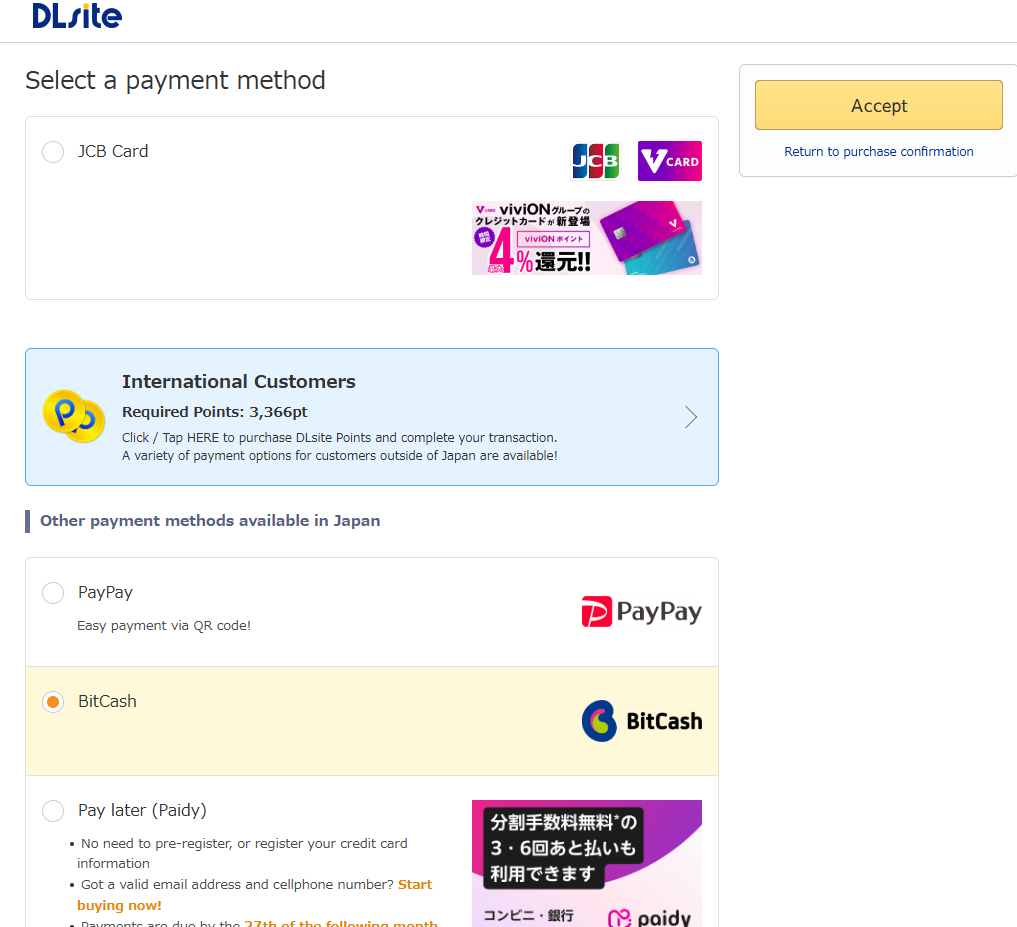
Checkout confirmation, where the card and points options appear If your card is declined, pre-load points
Approved
The order is complete. Continue to Step 5 and open the file the way that matches what you bought.
Declined → points bypass
- 1. Stop. Do not retry that card.
- 2. Turn on international use and 3-D Secure. Try once more only if the bank was blocking it.
- 3. Open My Page → Purchase Points and pick a method shown for overseas customers.
- 4. If the method is DLPay or a similar seller, enter the 16-digit serial from the email on the serial page while logged in. Points are not added automatically.
- 5. Return to the cart and pay with the point balance.
⚠️ Warning: Do not hammer a declined card. DLsite processes cards as credit charges with 3-D Secure. A message that the card number is wrong, even when you typed it correctly, is often a 3-D Secure block. After one correction, leave the card and buy points.
1 point = 1 yen. Card and BitCash point purchases show up immediately. Some other methods take about 5–30 minutes. DLsite's card-error help also documents a PayPal route for buying points from the comipo section (Purchase Points via PayPal) when the usual processor keeps rejecting you. Use it only if it still appears in your account.
Step 4
🎟️ Claim & Apply Coupons
A new viviON ID is eligible for coupons and point offers. DLsite also sends campaign coupons to existing accounts. There is not one permanent code that works for every title, so use whatever is attached to your account on the day you check out.
- Log in and watch the account notices, or the coupon area on My Page, for a coupon you can claim.
- Add the work to the cart and continue to the payment confirmation screen.
- Select the coupon in the coupon field before you confirm payment.
- If the list is empty, you do not have a usable coupon for that cart. Paying without one is normal.
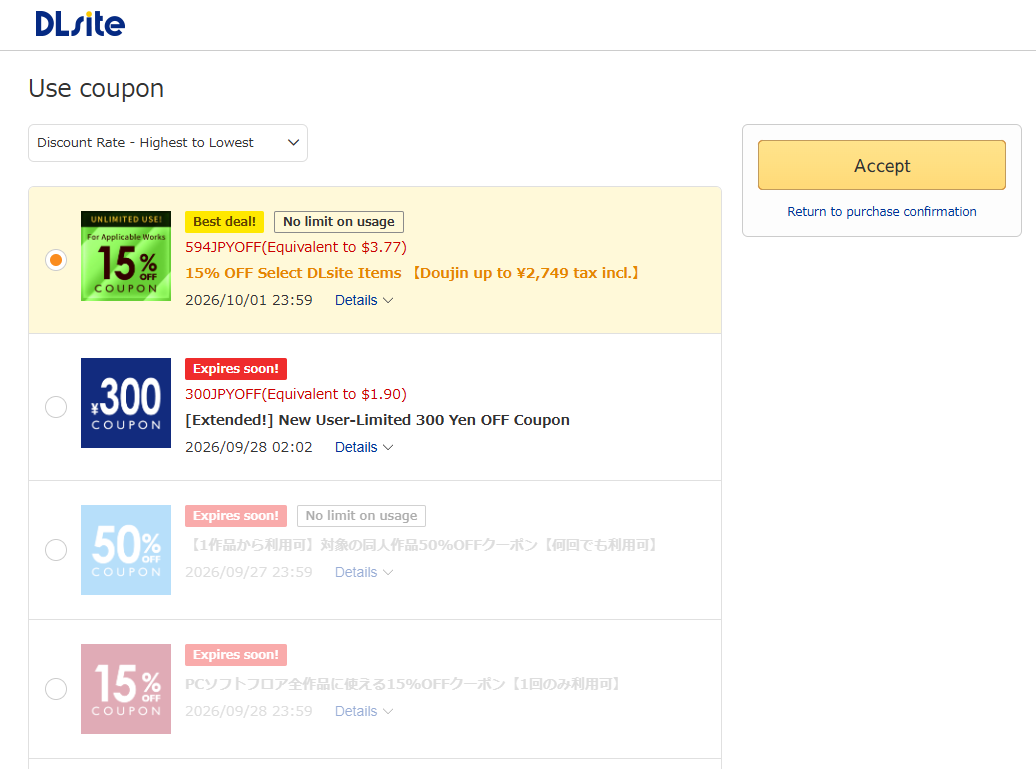
Coupon field on the confirmation screen, selected before you pay ⚠️ Warning: Select the coupon on the confirmation screen before you pay. A coupon applied after the order is complete will not rewrite that purchase. Cover the remainder with points or a card.
Step 5
🎮 How to Play / Launch
Playback starts from the same account that bought the work. You do not buy the file a second time to stream it. Voice and ASMR stay in the browser. Doujin PC games leave the browser and run on Windows.
DLsite Play streams compatible works in the browser. Nothing has to be unzipped first, and you do not install a separate app for this path. It runs on a computer, phone, or tablet as long as you are online and logged in with your viviON ID.
- Open Account → My Page → Purchased Items, then launch DLsite Play. You can also open it from My Items in the header.
- On a phone, use Safari (iOS) or Chrome (Android) while logged in. The library opens in the mobile browser.
- Pick the work and press play.
Only Play-compatible titles show up in that library. Streaming needs a connection. Headphones or earphones keep the left-right image of binaural and stereo ASMR intact.
Offline ZIP
- From the work inside DLsite Play, use Download and choose Download onto your device. You can also download from your purchase history.
- The file arrives as a ZIP in your downloads folder.
- Extract it, then open the audio in any player you already use (VLC, foobar2000, or the music app on your phone after you copy the files over).
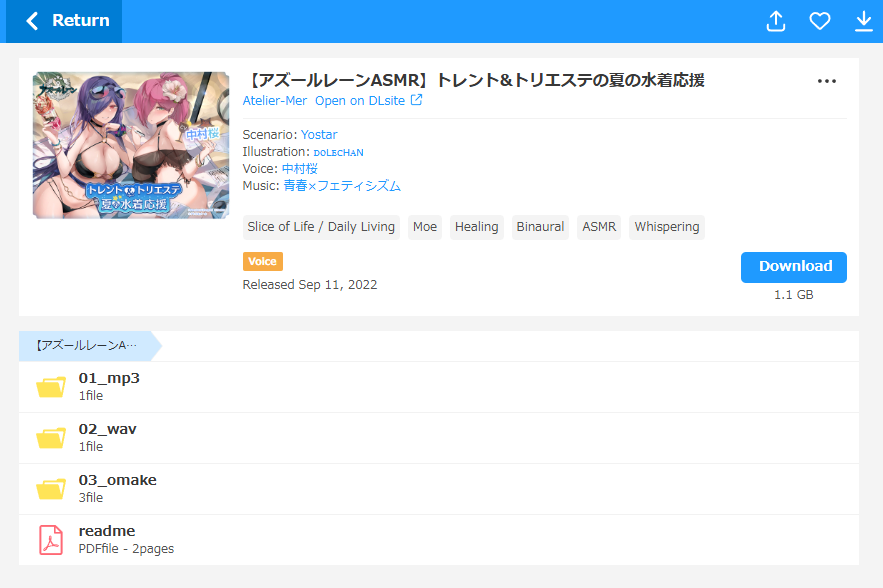
DLsite Play library in the browser Most doujin PC games are Windows downloads, not a phone stream. DLsite Play lists a game only when that product is marked Play-compatible. Otherwise use the archive.
- Open Account → My Page → Purchased Items (or My Items) and download the ZIP with Download onto your device.
- Extract the ZIP. Leave the extracted folder intact. Moving a lone
.exeout of its data folder is a common reason a game fails to start. - Run the executable. It may be the game itself or a short installer. A readme in the same folder usually names the file to launch.
💡 Quick Tip: Plan on a Windows PC. These
.exebuilds do not run inside Safari or Chrome on a phone.On a non-Japanese Windows install, menus and story text often turn into garbled characters because the game expects a Japanese locale (typically Shift-JIS). Locale Emulator fixes that without changing your whole system language: point it at the game's
.exeand run that process under a Japanese locale. It does not translate the script. It only makes the original Japanese text display correctly. If the window is still unreadable, confirm you launched the game executable, not a tool or uninstaller in the same folder.⚠️ Warning: Locale Emulator is a Windows helper for display locale. It is not a DLsite app, and it will not make a PC game run on iOS or Android.
ScreenshotDrop a screenshot of an extracted doujin game folder herepublic/guide/step5-game.pngExtracted game folder with the .exe left beside its data files
Common questions
Is DLsite safe and legal for international buyers?
Yes. DLsite is a commercial store operated by EISYS, Inc. in Japan. An overseas purchase is a normal digital sale in yen, with Japanese consumption tax already in the price. Card details are handled by DLsite's payment agency, checkout uses 3-D Secure, and the card statement shows "DLsite" without the title you bought. Age-restricted sections use an age check. You still need to meet that age requirement on the account.
What if my credit card gets declined?
Treat that as the expected case for many non-Japanese cards, especially debit cards. Turn on international use and 3-D Secure, try once more if your bank was blocking it, then pre-load viviON points and pay with the balance. Step 3 is the full path, including the 16-digit DLPay serial.
Can I play/listen on smartphones?
Voice and ASMR, yes. Log in and open DLsite Play in the phone browser. Compatible tracks stream immediately, with no separate app. Doujin PC games need a Windows environment: download the ZIP, extract it, and run the .exe. A phone browser cannot launch those games. If Japanese text is garbled, run the executable through Locale Emulator.
Does the site require a VPN?
No. DLsite is available worldwide, including the English UI and account registration. If a purchase fails, it is almost always the card issuer, not a regional block on the website. Use the points path instead of routing your traffic through another country.